
Concept
First, we need to understand the purpose of DataStore.
Currently, in Android apps, there are 5 ways to store data, with SharedPreferences being the simplest for storing data. It only consists of key and value, where the value can be an integer, string, etc.
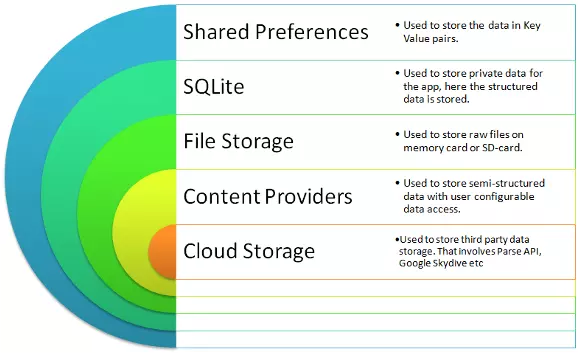
When the app is opened for the first time, it reads all values from the SharedPreferences XML file and loads them into RAM. This file reading process happens on the UI Thread. If there are too many values and the task takes more than 5 seconds, it will cause an ANR (Application Not Responding) error.
And DataStore was created to replace SharedPreferences.
DataStore is a solution for storing data as key-value pairs or typed objects with protocol buffers.
Of course, DataStore is still only for storing simple structured data. It uses Coroutines and Flow to store data asynchronously and consistently.
DataStore has 2 types: Preferences DataStore and Proto DataStore. Let’s look at the comparison table:
| Preferences DataStore | Proto DataStore |
|---|---|
| Store and access data by key | Store instances of a custom data type |
| No need to define data type in advance | Must define data type in advance with protocol buffers |
| No type safety | Has type safety |
Preferences DataStore
Create
To use Preferences DataStore, we need to create an instance of DataStore<Preferences> using a property delegate with the preferencesDataStore keyword.
| |
Read
First, there are 7 functions corresponding to 7 data types:
intPreferencesKey()longPreferencesKey()doublePreferencesKey()floatPreferencesKey()booleanPreferencesKey()stringPreferencesKey()stringSetPreferencesKey()
When reading data, use the function corresponding to the value you want to store. For example, to store a counter variable as an integer to count how many times the user opens the app:
| |
The difference from SharedPreferences is that here, data is returned as a Flow. Now, upper layers like Repository can observe data consistently, regardless of whether it comes from DataStore, Room database, or Server, because everything is returned as a Flow.
Write
To write data, use the edit function, which is quite similar to SharedPreferences.
| |
Proto DataStore
Before learning about Proto DataStore, let’s take a look at protocol buffers.
Protocol buffers
This is a data format that is independent of programming language or platform. It’s like JSON but much smaller and faster. Protocol buffers are also said to be the most widely used data format at Google.
- Used to store compact data
- Fast parsing
- Supports many programming languages like C++, C#, Dart, Go, Java, Kotlin, Python
- Optimizes functionality through auto-generated classes
For example, a message about user info with name, id, and email:
| |
To compare the performance of Protocol buffers and JSON, let’s make 500 GET requests from one Spring Boot app to another, with and without data compression. Here are the results:
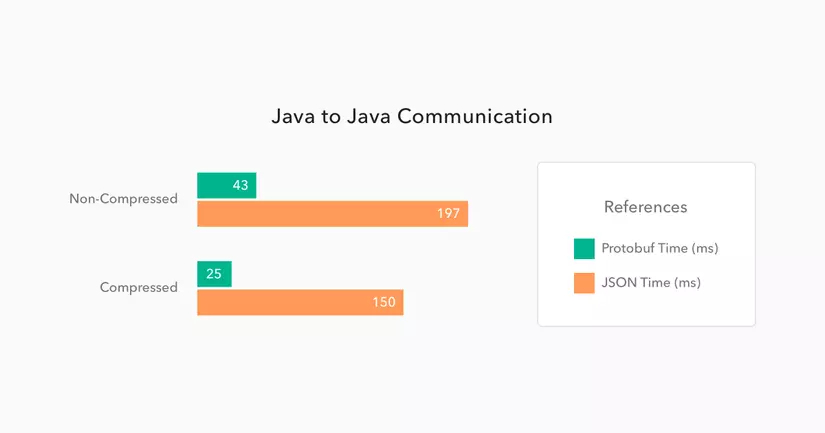
We can see Protocol buffer is 5 to 6 times faster than JSON.
Create
To use Proto DataStore, you must define the data type with a proto file settings.pb in the folder app/src/main/proto/ like this:
| |
Next, declare an object implementing the Serializer<T> class, where T is the data type defined in the proto file.
| |
Finally, use the property delegate with the dataStore keyword to create an instance of DataStore<T>.
| |
Read
Similar to Preferences DataStore, use DataStore.data to return a Flow.
| |
Write
To write data to Proto DataStore, use the updateData() function.
| |
Comparison with SharedPreferences
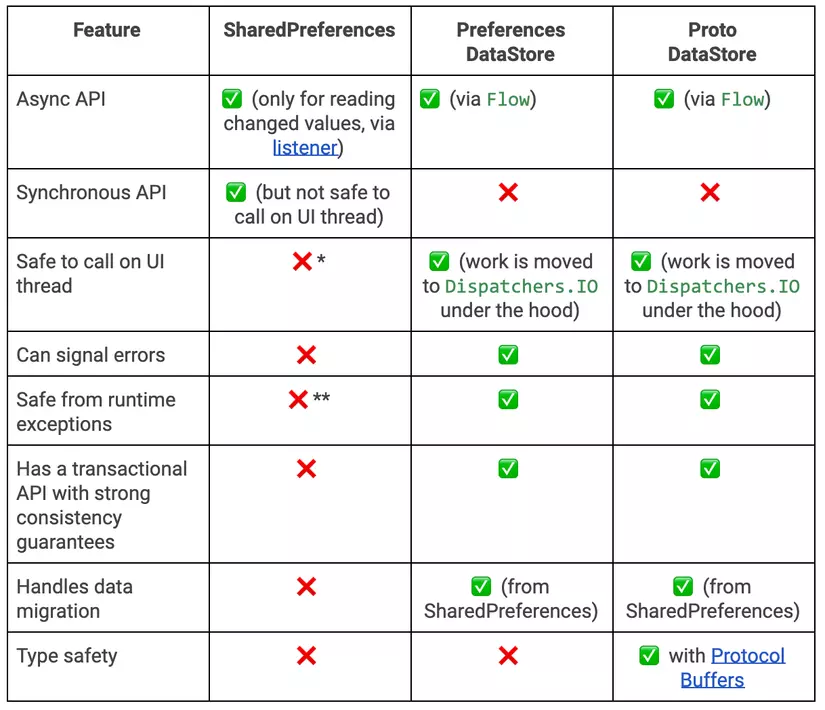
Migrate from SharedPreferences to Preferences DataStore
To migrate, pass SharedPreferencesMigration to the produceMigrations parameter. DataStore will automatically migrate for you.
| |
Migrate from SharedPreferences to Proto DataStore
First, declare UserProfile and UserProfileSerializer as above. Then write a mapping function to migrate from key-value pairs in SharedPreferences to the data type in Proto DataStore.
| |
References
- https://developer.android.com/topic/libraries/architecture/datastore
- https://protobuf.dev/programming-guides/proto3
- https://android-developers.googleblog.com/2020/09/prefer-storing-data-with-jetpack.html
- https://stackoverflow.com/questions/9986734/which-android-data-storage-technique-to-use
- https://auth0.com/blog/beating-json-performance-with-protobuf
- https://proandroiddev.com/is-jetpack-datastore-a-replacement-for-sharedpreferences-efe92d02fcb3
- https://kinya.hashnode.dev/migrating-sharedpreferences-to-datastore-ckxzlvda101by8rs1c8bg4wdx
- https://amitshekhar.me/blog/jetpack-datastore-preferences